December 17, 2025
by GForce Software
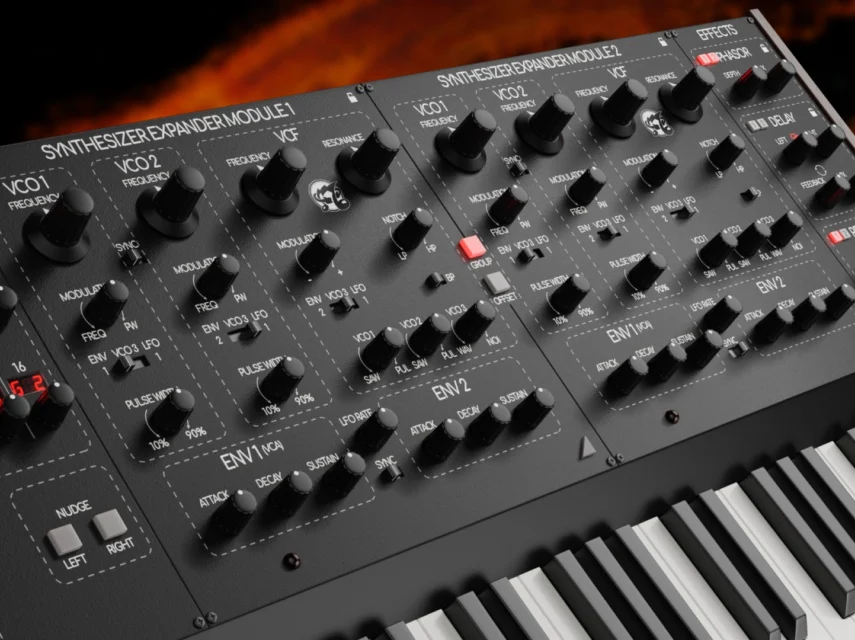
TVS Pro is a modern take on the Oberheim Two-Voice, a unique synth built around two independent SEMs and a pair of step sequencers that can run in several different configurations. The result is a synth that’s capable of stacked unisons, creative layering, or split keyboard setups.
In TVS Pro, the magic happens in the keyboard modes, which control how the SEMs and sequencers respond to your playing. There are three main keyboard modes: Key modes let you play the SEMs directly for monosynth behaviour, unison or simple split keyboard playing. Sequence modes let you trigger the sequencers from the keyboard, and Mixed modes split the keyboard between SEM and sequencer control. When using split modes, a small arrow appears above the virtual keyboard so you can set the exact point where the keyboard is divided.

Sequences and Bass
One of the most creative ways to use TVS Pro is to split the keyboard so one half plays a sequence while the other lets you play normally. With this setup, you can play a bassline underneath a moving melodic sequence, or flip it and play a lead over a sequenced part.
To do this, use either the Sequence and SEM Split or SEM and Sequence Split modes. In the former, notes below the split point trigger Sequencer A, which controls SEM 1, while notes above the split play SEM 2 directly from the keyboard.

You can hear this keyboard mode in action in the Portal Sequence preset, which is part of the TVS Pro Factory presets. The lower half of the keyboard uses a fifth interval with a slow envelope, and the upper half features a simple melodic sequence. The sequence only uses three notes: C, F and G, so lots of different fifth chords will sit nicely underneath without clashing. This is a great way to come up with interesting chord ideas.
You can hear a similar idea in the Suspended Motion factory preset, which uses suspended 2 chords on the bottom (R, +7 semitones, +14 semitones) with a simple sequence of fifths up top.
Sequences and Leads
You can also flip the idea around and have the sequencer down low, with a playable sound layered over the top. This is great for triggering basslines or ostinatos that stay locked to a rhythm while you play expressive leads and melodies up top.
Use the SEM and Sequence Split mode for this. Now, the lower half of the keyboard plays SEM 1 directly, while the upper half triggers Sequencer A, which sequences SEM 2. Just like before, you can move the split point anywhere you like with the little arrow above the keyboard.

The factory preset Quiet Quest uses this setup. The upper part is a gliding lead patch you can play, while the lower part is a repeating arpeggio that creates rhythmic movement. This is an inspiring way to compose new melodies.
The Stealth Mode preset uses a similar approach: the lower sequence is a rhythmic, single-note bassline and the high split is a lead sound.
Single Trigger
The Single Trigger mode plays both a sequence and a sustained note from a single key press. This is an ideal setup for creating layered patches, as you can trigger a bass note underneath a more animated melodic or harmonic sequence with one key.
Use the Single Trigger SEM & Sequence mode to try this out. In this mode, every note you play triggers SEM 1 directly, while also triggering and transposing Sequencer A, which controls SEM 2. You don’t have to play multiple keys or set up a split, just press one note and you’ll get both elements together, locked to the same pitch.

You can hear this in action in the Music for Ambient preset, where pressing a single key gives you a deep, slowly modulated bass note and a generative-style sequence above it. The sequencer part uses Random mode, so it slowly cycles through the available notes in random order.
Beneath the Tide uses a similar take on the same idea; the sequencer is programmed with a Major 7 arpeggio, and SEM 1 provides a simple sub bass one octave below. Because everything is built around the root note, you can create a moving Major 7 chord progression by just changing which key you press. This is a creative way to come up with unusual chord progressions.
Dual Sequencers
TVS Pro’s most powerful mode is Dual Sequencers, where both Sequencer A and Sequencer B run independently, controlling SEM 1 and SEM 2 respectively. You can create layered patterns and interlocking polyrhythms, with the keyboard split allowing for creative mixing of the two sequences.

The Night Pulse factory preset shows how this can be used for creative rhythmic effects. Sequencer A plays a steady low 16th-note arpeggio, while Sequencer B is set to a high 16th-note triplet sequence with a light sound. The result is sequences with two different rhythms and timbres, with natural contrast between them.
The Octave Delight patch uses a related idea: both sequencers use 16th notes but with different step lengths. Seq A has 8 steps while Seq B has 10 steps, causing them to slowly drift out of phase. Play a single note and listen as the pattern cycles subtly evolve.
The Infinite Echoes preset has both sequencers running at the same rate, but Sequencer A plays a low melodic arpeggio while Sequencer B repeats a single note. This lets you mix-and-match arpeggios with repeated melodic note.
There are plenty of other ideas to explore too, like programming the SEMs with contrasting sounds, tuning each one to full chords, or trying out the No Trigger and Free Sequence modes for something more generative.